 |
Canon |
If you have marked about Settings  Options Explorer "Canon digital camera support"
, then the possible settings here are used at the show in the Image Explorer and for export also.
Options Explorer "Canon digital camera support"
, then the possible settings here are used at the show in the Image Explorer and for export also.
look also "Explorer Canon"
- Export format: for export you should use the JPEG-format, off course, every other format is possible, too.
If you use the RAW-format with your camera, you should use the JPEG-Lossless-format on your computer, which enables to you a not lossy storage combined with a good compression.
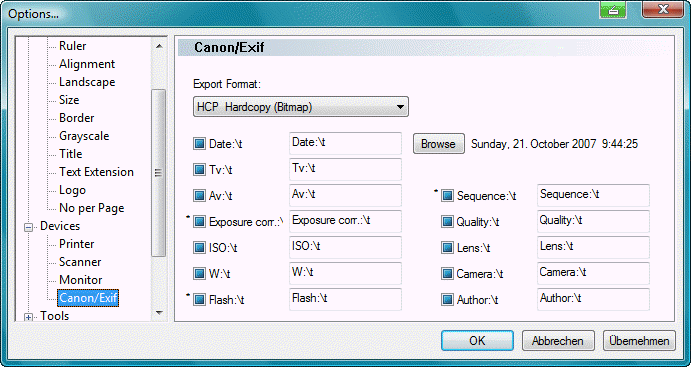
- At the entries which you have marked the text shown here is put out, as well as the value of the camera.
- You can change the text, which is shown before the entry.
- The character sequence \t is interpreted as tabulator.
- If you don't want text before the value, please enter the character < .
(The value is put out then left justified.)
- If you delete a text, the standard text is put to disposal.
- At the entries, which are indicated with * , you have 3 possibilities:
- Not marked: nothing is put out.
- Normal marked: text and value are put out always.
- Marked with a gray background: text and value are put out only, if a value exists.
Example: "Flash: used" is put out only, if the flash has been used.
In the following an example; from the 2nd image up the exposure was corrected.
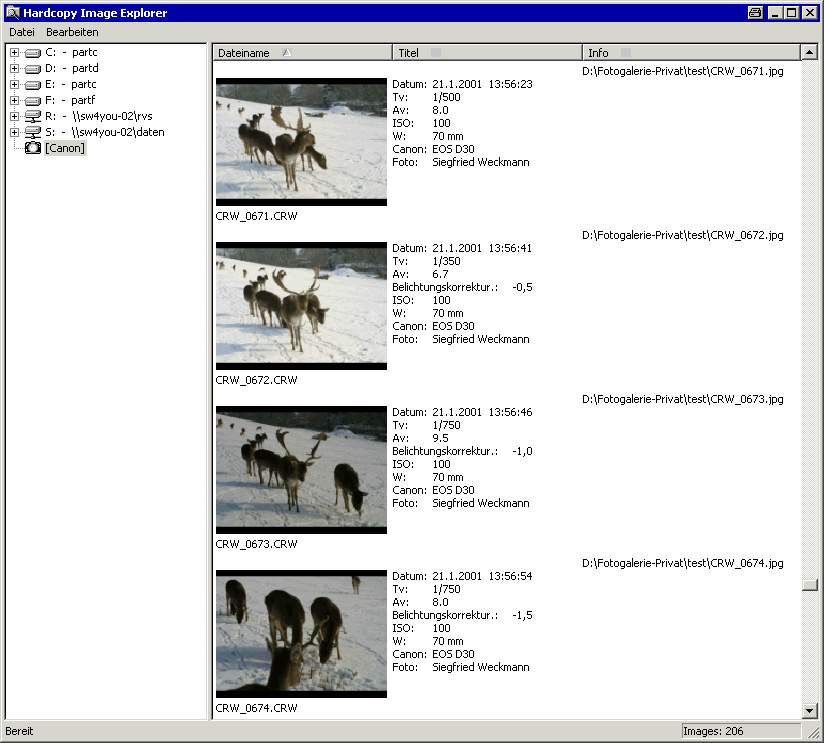
By the way you can see at the filenames in the right column, that the image was already transferred to the PC.
Letzte Änderung / Last update: 08.05.2024 09:30:17